The whole Mac at a glance
CPU with performance and efficiency cores, GPU, and unified memory with pressure, compression and swap. Everything that matters on Apple Silicon, without the noise.
A lightweight, native monitor for Apple Silicon and the local AI models running on it. CPU, GPU and unified memory, your processes, and which model is loaded and generating, in one calm window and your menu bar.

CPU with performance and efficiency cores, GPU, and unified memory with pressure, compression and swap. Everything that matters on Apple Silicon, without the noise.
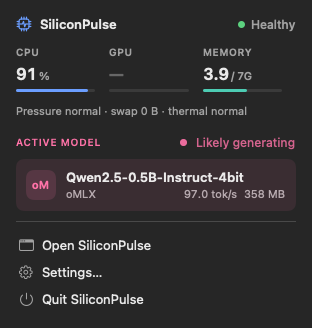
Which model is loaded, in which runner, how much memory it takes and whether it is generating right now, with a live pulse while it works.
A live summary like “Qwen3 · GPU 91% · 38 tok/s” and a popover with the essentials. Under 1% CPU while it sits there.
Local AI
SiliconPulse finds the runners on your Mac and asks them, on 127.0.0.1 only, what they are doing.
Shown: a real oMLX server serving Qwen2.5 0.5B.

Menu bar
Health, CPU, GPU and memory, and the active model with what it is doing. Open the full window only when you want the details.
Honest numbers
macOS does not expose everything. When something is measured, SiliconPulse shows it plainly; when it is inferred, it says so; when it is not available, it says why. Hover any value to see where it comes from.


Private and light
No Electron, no web views, no telemetry. History lives in memory and is gone when you quit. The source is on GitHub.
If macOS says it could not verify that SiliconPulse is free of malware, open System Settings › Privacy & Security and click Open Anyway. You only need to do this once; the release notes say when a build is notarized.
Screenshots come from SiliconPulse's automated tests on a virtual Mac, which reports no GPU utilization; on a physical Apple Silicon Mac the GPU column is live. Model names marked “mock” are test stand-ins.